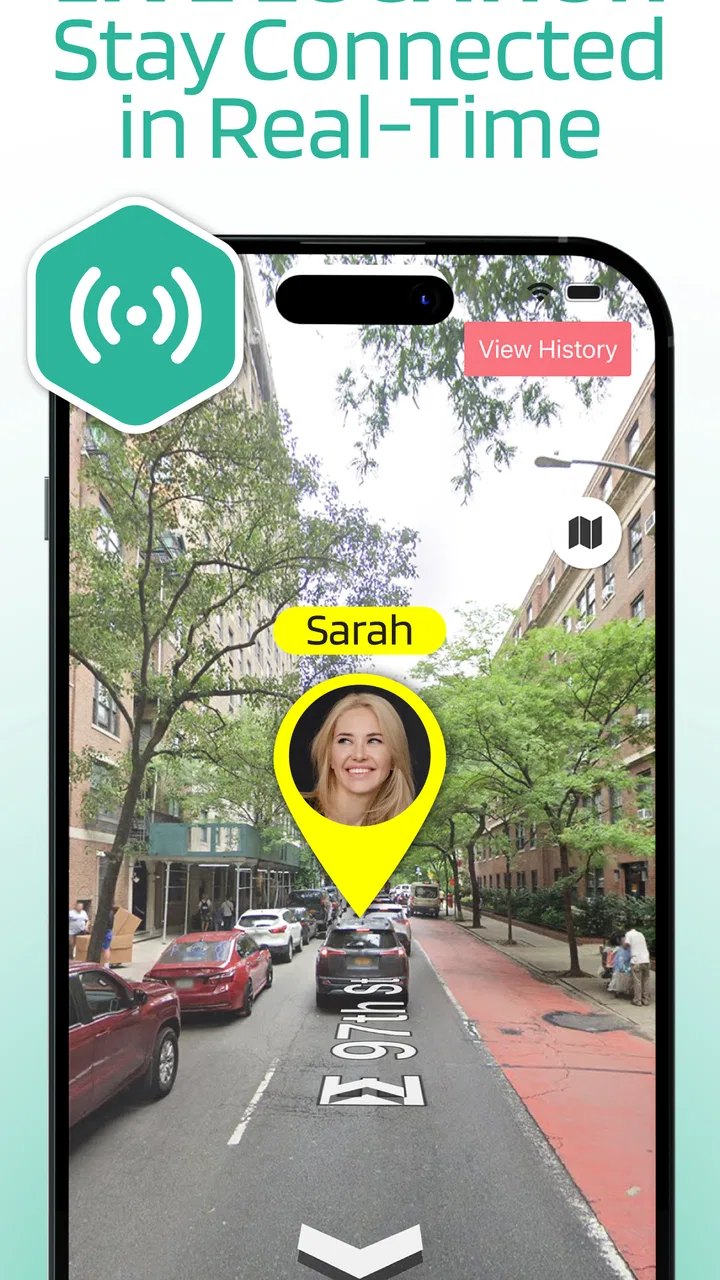
Smart Family & Kids Locator
- 3.6
- Rating
- 10.00K
- Installs
- Free
- Price

 Analysis by App-foxy
When a family member is late, travelling alone, or simply hard to reach, the first problem is usually not a lack of concern but a lack of context. A missed call tells me very little. A location tool can reduce that uncertainty, provided everyone understands how it works and agrees to use it. That is the role I see for Smart Family & Kids Locator: a free parenting app from LSA LTD built around phone-number location tracking and family location sharing.
I approached it as a practical family workflow rather than a novelty. One person needs to be found, another person needs to request or view a location, and the whole process depends on a phone being available and the people involved cooperating. That makes this less like a silent safety net and more like a shared household tool. In my experience, that distinction matters before anyone installs it.
The app is rated for Everyone, which fits its family-oriented purpose, and it runs on Android devices using Android 7.0 or later. It has passed the early adoption stage with over ten thousand installs, while its average score sits at 3.6 from around one hundred ratings. I would read that combination as a reason to approach it with sensible expectations: useful for a specific need, but not something I would treat as a complete replacement for communication or emergency services.
You May Also Like

 Blood Strike: 2.5 Anniversary
Blood Strike’s Loadouts Turn Every Drop Into a Tactical Gamble
A close look at Blood Strike’s custom loadouts: how fast access to signature weapons reshapes its battle royale rhythm, rewards preparation, and narrows the gap between fights.

 Pandora - Music & Podcasts
Pandora’s Music Is Easy to Start, but Harder to Recover
Pandora’s strength is its low-effort path from a seed to a station. Its weak spot is how much confidence it asks you to place in connection, setup, and quiet recovery.

 8 Ball Pool
 Is Built on Rivalries, Rematches, and Routine
A close look at the rivalries, rematches, shared routines, and unanswered safety questions that turn a quick pool match into a persistent mobile community.

 Samsung Music
’s Quiet Strength Is Playing What You Already Own
Its reach comes less from spectacle than from dependable access to a personal library. That simplicity is both the app’s strongest retention engine and its ceiling.

 AccuWeather: Weather Radar
AccuWeather Review: A Quick, Clear Forecast for Everyday Decisions
For everyday plans, the best forecast is the one you can understand quickly. AccuWeather makes rain timing, radar, and local conditions easy to act on, with a few trade-offs.

 Hill Climb Racing
Why Hill Climb Racing Still Turns Crashes Into One More Run
A tiny car, a bumpy hill and one more upgrade: Hill Climb Racing keeps resurfacing because its simple chaos makes every near-miss feel personal.
More From Our News Desk
View All News


From a missed check-in to a shared location
I’ve found that the useful question is not simply whether a location app can show a phone, but what the family should do when a check-in is missed. This section looks at how a calm, agreed routine can turn that uncertainty into a practical request, while keeping the person’s choice and the limits of the tool in view.
Start with the family situation, not the app
The best starting point is a clear household rule. For example, a teenager may send a location when leaving school, a partner may share a position during a long journey, or an older relative may use the app when a planned arrival is delayed. The purpose should be agreed before a stressful moment. Location sharing can feel intrusive when it appears suddenly, whereas the same action feels reasonable when everyone knows why it is being used.
I would first decide who needs to share and who needs to receive. A parent checking a child’s journey has a different need from two adults coordinating a meeting. The app’s family focus makes it suitable for these arrangements, but it does not remove the need for consent and clear boundaries. If a person does not want to participate, trying to turn a location app into a hidden monitoring system is the wrong approach.
The phone-number focus is also important. It suggests a workflow that begins with identifying the relevant phone rather than building a complex map of every person in the household. That can be convenient for a family that wants a direct, simple setup. It also means I would pay close attention to the number entered, the intended recipient, and whether the person being located understands the request.
Set up the first request carefully
Once the family has agreed on the arrangement, I would install the app on the phones that need to take part and check compatibility first. The minimum operating system is Android 7.0, so an older device may need attention before the family relies on it. I would also update the app where possible; the current version is 1.13.6, and keeping the same recent version across participating phones is a sensible way to reduce avoidable setup confusion.
The first request should be treated as a test, not as an emergency drill. I would ask the other person to participate while both phones are together, then confirm that the intended location is associated with the correct family member. This simple rehearsal is one of the most useful steps because it exposes mistakes in phone numbers, account details, or expectations before someone is waiting outside a school, station, or workplace.
I would avoid setting up the app while rushing. A location tool is only helpful if the people using it know what action is expected from them. One person may assume that installing the app automatically shares a position, while another may expect a request or confirmation. Those assumptions can create the exact delay the app is meant to reduce.
Move through the request-and-response handoff
The central handoff is between the person asking for a location and the person whose phone is being located. That handoff deserves more attention than the map itself. The requester needs to identify the right family member, send or initiate the location request through the available workflow, and wait for the other side to complete whatever response the app requires.
On the receiving phone, the family member should recognize the request and respond intentionally. I would explain this in plain language to a child: this is not a game, and the location should only be shared with the agreed family contact. With an older relative, I would demonstrate the process several times and keep the explanation short. The practical goal is not technical confidence; it is making the correct response easy under pressure.
This is where Smart Family & Kids Locator can be more useful than ordinary messaging for a narrow task. A text saying “Where are you?” depends on the recipient typing back an address or description. A location-focused workflow aims to turn that exchange into a position that the family can interpret. Still, messaging remains valuable as a backup because a map does not explain why someone is delayed, whether they need help, or whether the phone is in someone else’s hands.
The strongest workflow is location sharing plus a short human check-in, not location sharing instead of one. I would use the app to answer “where?” and a call or message to answer “are you safe?” That division keeps expectations realistic and prevents the family from treating a location marker as a full safety report.
Use it in an ordinary evening scenario
Imagine a child normally walks from an after-school activity to a parent’s meeting point. On one afternoon, the child does not arrive at the agreed time. The parent first calls. If there is no answer, the parent can use the established family-location workflow rather than repeatedly sending anxious messages. The child receives the request, responds through the app, and the parent can see whether the phone is still near the activity center, moving along the usual route, or somewhere that needs clarification.
The result is not automatically a solution, but it gives the parent a better next decision. If the phone is still at the activity center, the parent can contact staff. If it is on the expected route, the parent can wait or call again. If the position is unexpected, the parent can escalate to a direct conversation or seek appropriate help. The app contributes context; the family still supplies judgment.
This example also shows why a test run matters. If the child has never handled a request, the moment of concern becomes a lesson in buttons and permissions. If the process has been practised, the child knows what the request means and the parent knows what kind of result to expect. That preparation is a more meaningful benefit than simply having a location app installed.
Make the handoff work for different ages
For younger children, I would keep the arrangement narrow: one or two trusted adults, a clear reason for sharing, and a simple routine such as sharing when leaving one place and arriving at another. I would not encourage constant checking just because the tool exists. Frequent monitoring can create pressure and may distract from teaching a child how to make safe decisions independently.
For teenagers, the conversation needs more respect for privacy. I would agree on specific situations in which location sharing is expected, such as a late-night journey or a changed travel plan, rather than presenting the app as permission to watch every movement. That approach is more likely to produce honest cooperation and less likely to turn the tool into a source of arguments.
For an older family member, the main challenge may be remembering the sequence. A written instruction beside the phone can help: receive the request, open the app, confirm the correct family contact, and share the location as agreed. I would also make sure the person knows that a location request is not a substitute for calling emergency services when there is immediate danger.
Understand the practical limits before relying on it
The app’s free availability makes it easy to try, but it includes in-app purchases priced from $7.99 to $49.99 per item. I would not assume that every useful part of the experience is included at no cost. Before building a family routine around a paid option, I would inspect the purchase screen carefully and confirm what the charge unlocks, whether it is necessary for the intended workflow, and whether every participating family member needs the same arrangement.
This is especially important when setting up the app for a child. The adult who installs it should handle purchase decisions and explain them to the household. A free download can still lead to paid choices, so I would not hand the phone over without checking the available screens first. The difference between “I can test this” and “I am ready to depend on this” should be clear.
Another limitation is the human handoff itself. A phone may be switched off, forgotten, out of reach, or unavailable to the person who needs to respond. A location request cannot solve a dead battery or a missed notification. For that reason, I would keep a second plan: a normal call, a known meeting place, and a trusted contact who can help if the app does not produce a usable result.
Compare it with the usual alternatives
Compared with ordinary phone calls and messages, the appeal here is the location-centered workflow. A call can be more informative when someone answers, while a message is better for leaving detailed instructions. Smart Family & Kids Locator is more focused when the immediate question is the phone’s location and the family has already agreed on the sharing process.
Compared with broader family-safety platforms, this app may appeal to someone who wants a simpler phone-number-based starting point rather than a large collection of household tools. The trade-off is that a narrower tool may require more support from calls, messages, and family rules. If you want a full family dashboard, extensive automation, or a mature ecosystem of connected services, I would look at established alternatives in that category before committing to this one.
Compared with built-in location sharing already available on many phones, the choice depends on familiarity and convenience. A family may already have a reliable system that everyone understands, in which case adding another app could create duplicate requests and confusion. Smart Family & Kids Locator makes more sense when its direct workflow is easier for the people involved than the tools they already have.
Where the workflow breaks
The first break point is setup. An incorrect phone number or an untested family connection can send the request toward the wrong person or leave the requester waiting. The remedy is straightforward: perform the first test face to face and label contacts clearly. I would never make the first real use a time-sensitive one.
The second break point is consent and response. If the receiving person does not understand the request, refuses it, or cannot reach the phone, the workflow stops. That is not necessarily an app failure; it is a reminder that location sharing depends on people. Family members should know that the app is a cooperative tool, not an invisible tracking guarantee.
The third break point is interpretation. A displayed location can be old, imprecise, or simply misunderstood by someone who does not know the area. I would treat it as a clue for the next action, not as proof that everything is fine. Calling the person or a nearby trusted adult remains important when the situation feels unusual.
The fourth break point is over-reliance. Parents may be tempted to check repeatedly, while children may feel that every delay will trigger a request. That can damage trust and make the app less effective when it genuinely matters. A written family agreement about when to use it keeps the tool focused and reduces unnecessary friction.
Who should try it, and who should skip it
I think the app is most suitable for a small family that wants a direct way to coordinate location sharing around specific routines. It can be helpful for school journeys, changed pickup plans, long commutes, and relatives who occasionally need assistance explaining where they are. The free entry point also makes a controlled trial practical, as long as the family reviews any in-app purchase before accepting it.
I would be more cautious if the family needs continuous, highly dependable monitoring, detailed safety automation, or a broad set of emergency features. In those situations, a more established family-safety service or the phone’s built-in tools may be a better fit. I would also skip it if the household cannot agree on consent and boundaries. No location app can repair a trust problem, and adding one may make that problem worse.
It is also not the right choice for treating a location marker as emergency protection. If someone is in immediate danger, the family should use appropriate emergency channels. This app belongs in the everyday coordination layer: useful for finding context, confirming a journey, and deciding what to do next.
My final assessment after following the full workflow
Smart Family & Kids Locator has a clear practical idea: connect a phone-number-based location request with family sharing. I like it most when the family defines a small routine, tests the handoff, and keeps calls or messages available as a second channel. In that setting, it can turn a vague “Where are you?” moment into a more informed conversation.
My reservations are equally clear. The experience depends on cooperation, phone availability, and sensible interpretation. The moderate 3.6 average from around one hundred ratings suggests that I would test it personally rather than assume it will suit every household. I would also remember that the app is free to download but offers in-app purchases ranging from $7.99 to $49.99 per item.
For a family looking for a focused parenting tool on Android 7.0 or later, it is worth trying with a low-stakes rehearsal first. I would install it, involve only the trusted people who need it, practise one realistic scenario, and decide whether the handoff feels simpler than the family’s current method. If it does, the app has a useful place in the routine. If it creates more questions than answers, staying with familiar calls, messages, or built-in sharing is the wiser outcome.
FAQs for Smart Family & Kids Locator
01What is Smart Family & Kids Locator used for?
Smart Family & Kids Locator is designed to help families stay connected by sharing locations and checking the whereabouts of approved members. After setting up a family group, parents or guardians can view a child’s recent or current location, depending on the phone’s permissions and connection. It may also provide safety-related tools, but it should be treated as a communication aid rather than a replacement for supervision.
02Does Smart Family & Kids Locator require permission from every family member?
Yes. Location-sharing applications need access to device location services, and family members generally must accept an invitation or approve sharing before their position can be viewed. On a child’s device, additional permissions may be required for background location, notifications, and battery usage. It is important to explain what data is shared, who can see it, and how to stop sharing before completing the setup.
03Will the app track a child’s location continuously?
The accuracy and frequency of tracking depend on the selected settings, phone permissions, internet connection, GPS availability, and battery-saving restrictions. Some devices may limit background updates when the app is inactive or the battery is low, so the displayed position can occasionally be delayed or approximate. Parents should not assume that the map always represents a real-time location.
04Does Smart Family & Kids Locator work without an internet connection?
The app normally needs mobile data or Wi-Fi to send a device’s location to the family account and display updates on another phone. GPS may still determine a position when the internet is unavailable, but that information may not reach other users until the connection returns. For dependable use, keep location services enabled and make sure the device has sufficient battery and network coverage.
05Is Smart Family & Kids Locator free to use, and is it safe for privacy?
The app’s available features, subscription options, and possible in-app purchases can vary by platform, region, and current developer policy, so check its store listing before downloading. Because location data is sensitive, review the privacy policy and requested permissions carefully. Use strong account credentials, invite only trusted people, and remove former members or disable sharing whenever the family arrangement changes.
Pros
- Real-time location sharing helps families coordinate pickups and daily routines.
- Geofencing alerts can notify parents when children enter or leave saved places.
- SOS features provide a quick way to request help during an emergency.
- Location history may help identify travel patterns and missed check-ins.
- Supports family accounts for managing several members from one app.
Cons
- Continuous GPS use can noticeably reduce a phone’s battery life.
- Some features may require a paid subscription after the trial period.
- Location accuracy can drop indoors or in areas with weak signal.
- Children may feel uncomfortable with constant monitoring and tracking.
- The app requires reliable mobile data or Wi-Fi to update locations.

Smart Family & Kids Locator
Gallery